i have built a simple calendar that allows the user to find the times of the months, weeks, eclipses, solstices and equinoxes, no matter what part of the world they are located. This allows them to be with all others who are on the map of the Moon’s Month.
Eclipses, Solstices, Equinoxes and the Moon Phases, are calculated from the axis or the center of Earth, the center of the Sun, the center of the Moon, and the galactic center precisely. This means that it is one point that is one location, in every traversal of all the stations of the Galactic Center, the Sun, the Earth, and the Moon, where the whole world of human, experiences the focal location of the alignment of three or more heavenly bodies. This is form. This is what we are. In that split place along the never stopping movement of the everything, there is connection of energy. The accents in the dance of life. The more human conscious of these movements, the more shift of dimension for the human. It is not time. It is moving location.
If you record the Sun or Moon traversing a constellation boundary, you are using the constellation in the same way one uses a light house. You have your own personal Zenith, and when you look at the Moon, you see a constellation directly behind it, but compared to the Moon, the distance this constellation is from you is great. As it traverses the boundary, there is a perfect straight line through three points on the map, the point in the Constellation that you are observing that is directly behind the Moon, the Moon, and You, so you can use this to determine exactly where you are.
On a full moon, all human have a personal line up at their exact location, when they are physically exactly in a direct straight line (but given the leeway of the plane of the Solar System), between the Sun and the Moon. As the Earth rotates, this movement is like a wave of energy that sweeps across every human as it connects them in flowing frequency, but where it is recorded in this calendar, it is the Earth itself who has the exact line up, which means all energy of this particular polygonactically trajected movement, is channeled through every human all at once. It is a peaking moment, but it is actually the fact that it is the particular location, of all states of being at this point, that is in effect, the powerful energy that has the nature of gates opening and closing. It is a culminating geometric vortex. If you consider the electric and magnetic energy of every star and planet in the galaxy, and consider that every line up connects energy in different structural formats, then you begin to see what is everything.
If your Zenith, was exactly pointing to the Moon, on the Earth’s placement of exact full Moon, you would experience it with the nature of both energies. Your Zenith is a line that is from the exact center of Earth and through you, outwards to space.
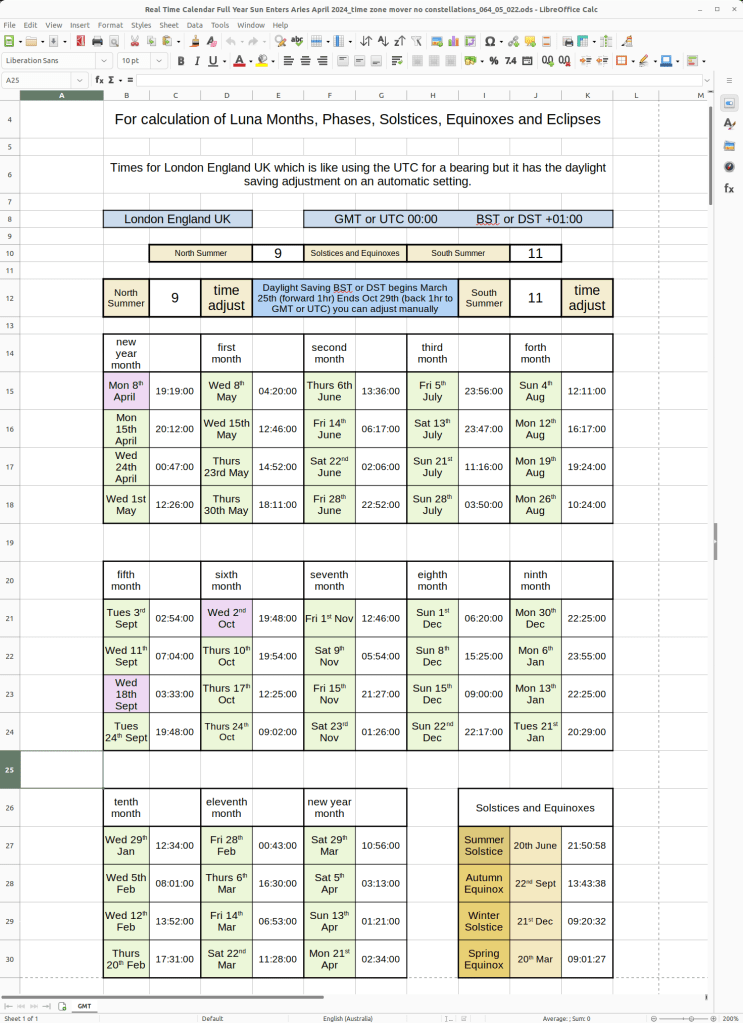
I have built the time zone adjuster with a few input data cells, so that you can enter the amount of hours different from UTC time to where you are, on both the standard time and the daylight saving time. I used London as a time zone as this is UTC but it is plus one hour in London’s daylight saving months.
I have it on protect the sheet with the appropriate cells open but you can unlock it and change things if you want to.
In Australia, i put plus nine hours from the London daylight saving time to suit my standard time, as i am at plus ten hours from Coordinated Universal Time UTC, and i put plus eleven hours from their standard time to get my daylight saving time.
Because of the individual date shifts of daylight saving around the world, i want to do thirteen different patterns of the dates, of the different daylight saving time shifts. For now this tool can still help people to be on the map.
It will be wonderful if the user can edit it to bring it to their location by also adjusting the week length, as they move into the next day on some time zone adjustments. i want to look at graphs in this spread sheet program, and see if it is possible to make it automatically adjust, and also see if i can do that with the date also.
i found wonderful way to title the input cells. There is a North Summer and there is a South Summer, so you put your daylight saving shift for which Summer is yours. There is a description on the calendar that tells your what the dates of London’s daylight saving shifts are, so you know which ones you are adjusting.
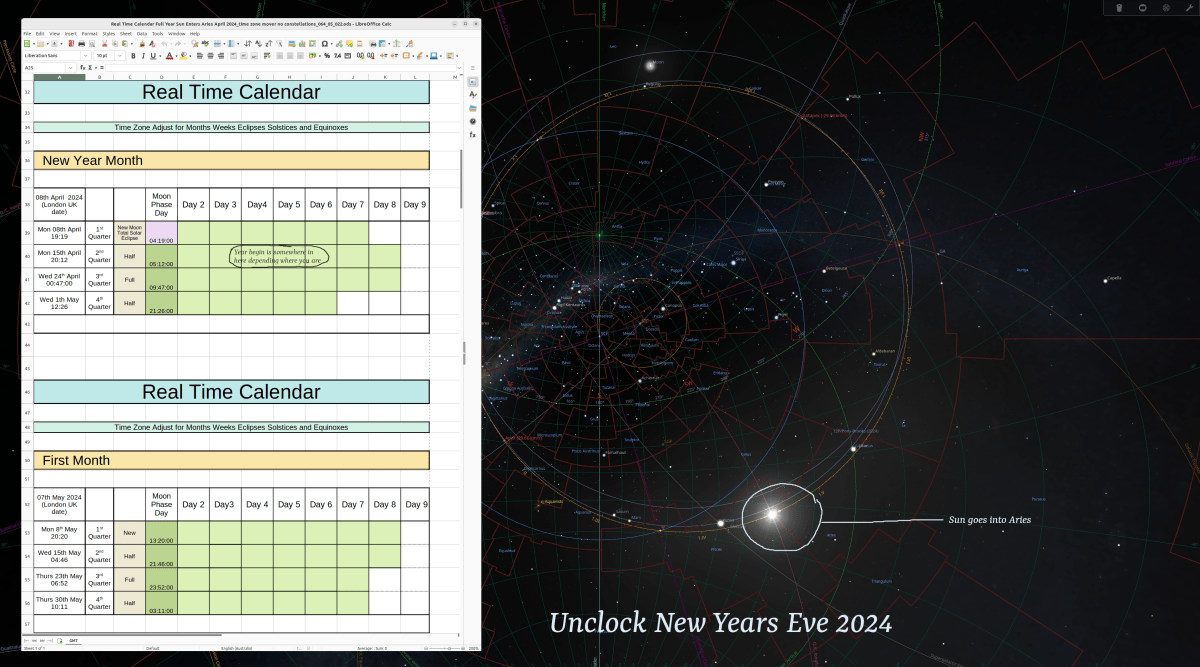
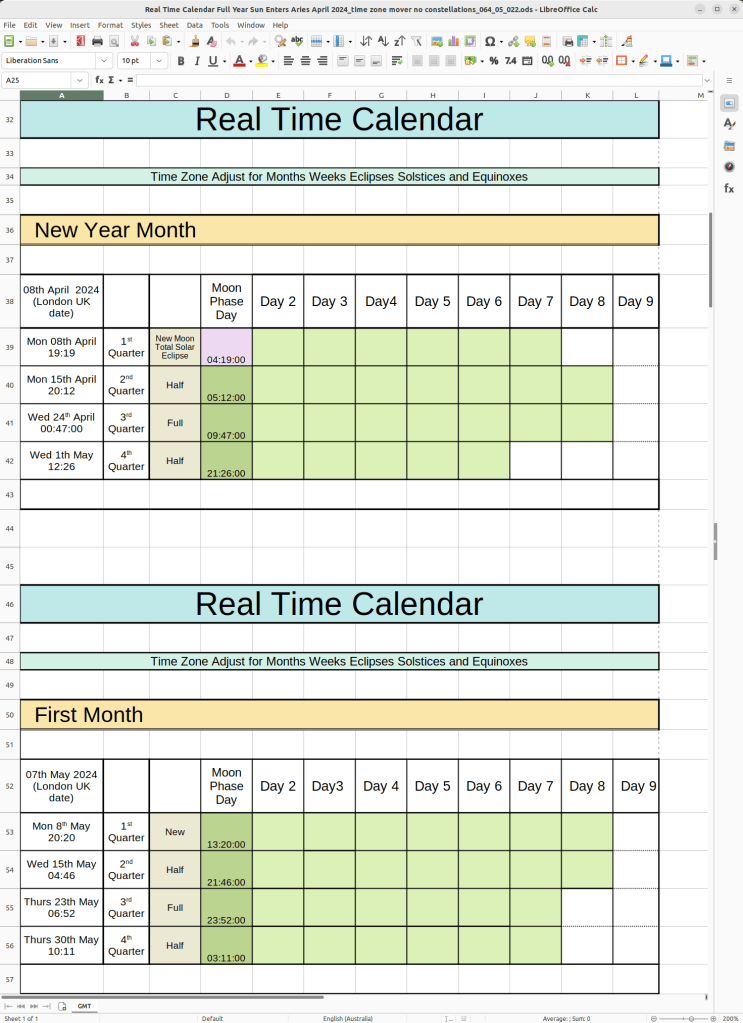
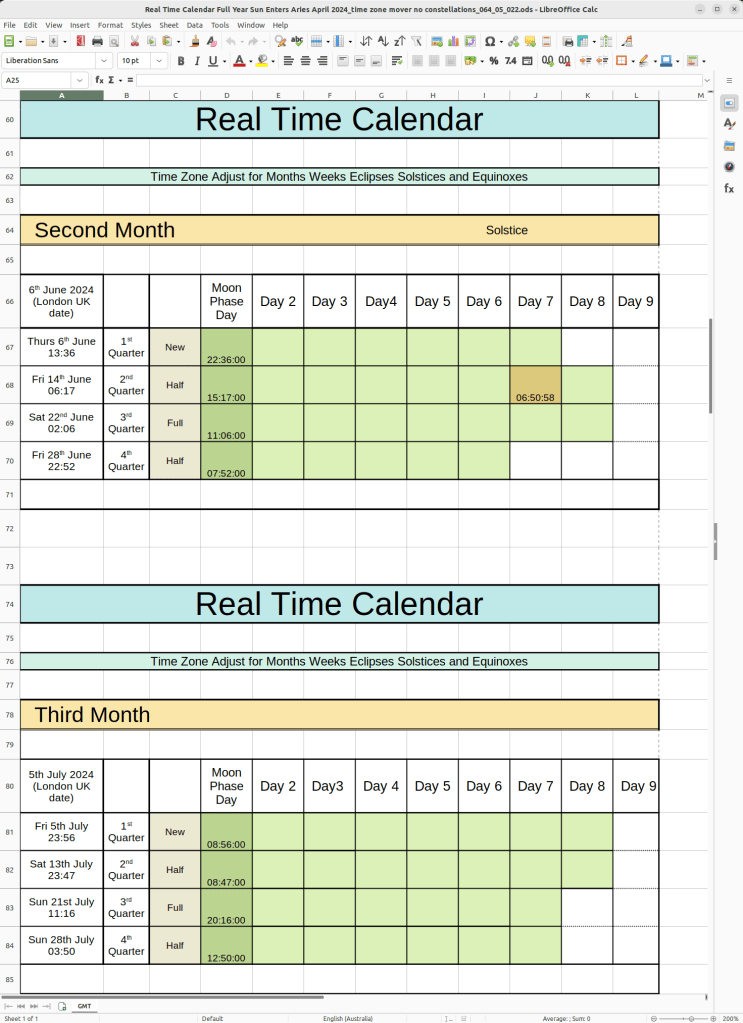
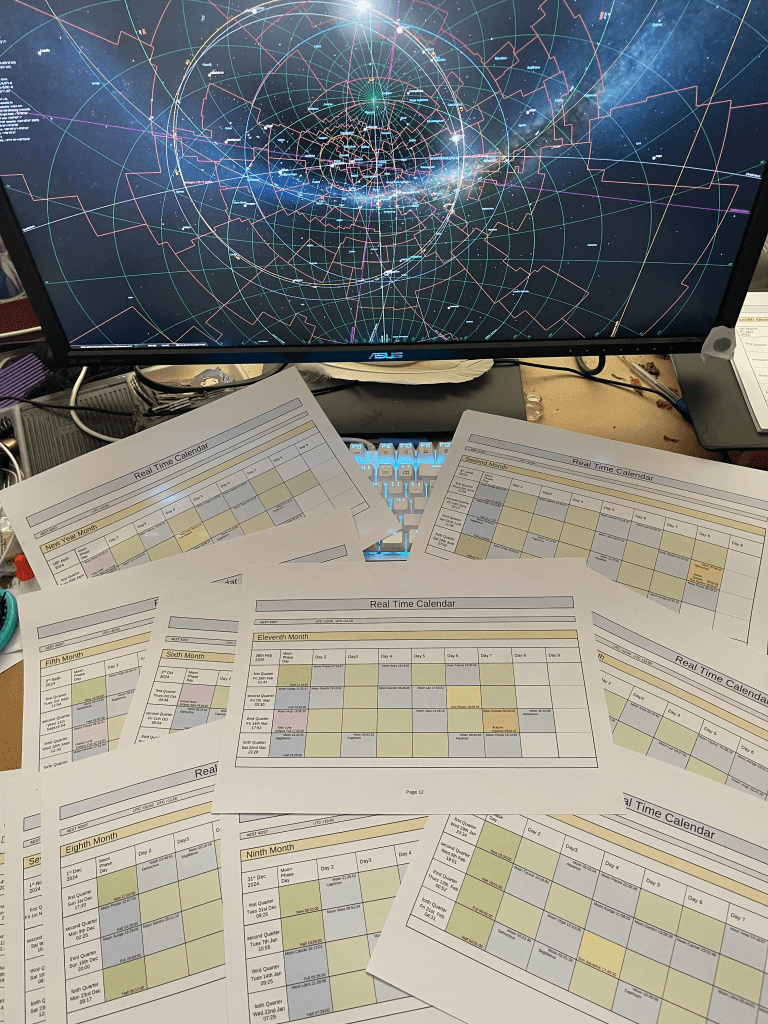
i have put the time adjustment to suit where i live in these pictures, and you can see how it has altered the data in the calendar and having the original London time in the data page.
This is the calculations page. There are four cells where you can put the amount of hours you need to put to adjust the time zone for where you are. This page is largely to hold the data of the time at London UK which is Coordinated Universal Time UTC except where they have their daylight saving times.
The Calendar is locked under, ‘Tools>Protect Sheet…’ and ‘Tools>Protect Spreadsheet Structure…’. It doesn’t need a password. It just needs click ok.
Each cell of the ‘Moon Phase day’ data has an equational function in it. It gets its data from the data page and the cell that you enter your time shift hour amount in.
There is one puzzle about this so far, and that is, you can’t put a negative number in the time adjuster as yet. This is all still usable but it will mean, you maybe have to go forward to get your time where you would have gone backward, so the date will go to an obscure place but you will have your correct time.
I made a picture of this one also, to show that i wrote ‘Solstice’ in the heading with the month, because i have an equation in the Solstice cell and i didn’t want to put the description title in another day’s cell. This follows for the equinoxes also.
The apps used were, ‘Moon Seeker’, for the Moon phases, ‘Sun Seeker’, for the Solstices and Equinoxes, and ‘Eclipses’ for the Eclipses. The unclock still gets used as an over seer.
To find the Solstices and Equinoxes, touch the button at the top right that says, ‘Now’, or it may say a date if not now.
If you like playing with this, you can alter the dates and week lengths if it changes for your location, and make a PDF to print out, or make a print out with your time adjusted, and make adjustments to the weeks and dates with pencils and things.
This is the first time i have brought a spread sheet, and i put it in a zip file. It is built in LibreOffice Calc, and i also made a word 2003 version. (i’m not sure if this is helpful. It is just what was available in LibreOffice.)
i recently realized that i have not a full description of how i put together my unclock that i use.
I am working towards building an Unclock App. i want to build one for desktop and i want to build an Augmented Reality System in a pair of contact lenses with a watch for a controller. At this stage i am still using desktop technology to work with.
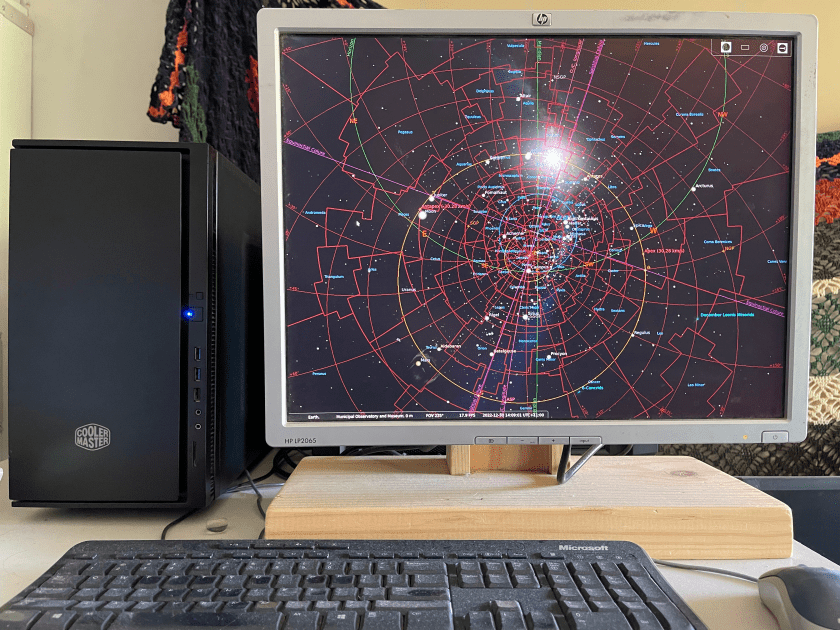
the hardware
The first thing i recommend is the element of it able to be quiet. For the unclock to work, it needs to be on non-stop, so a small build i believe is a good choice.
I purchased a mid tower case that is a focused on quiet and it has a small amount of insulation inside it. I chose a build that is light enough powered that it only needs one exhaust fan. I then chose a superior fan by Noctua, as this company likes to build quiet fans. It has a graphics card, that lets it’s fans turn off when the computer is not working with a high load. I eventually want to do this for the power supply also. (i believe the smaller your graphics card is the better, as it is good to be aware of the fact that it could bring more heat than your case and fan is built for, if you do make the computer use excess power.) If the motherboard and cpu that you use, is able to function without a graphics card, then it can run Stellarium without a graphics card, and this can be a good choice. You can also consider a cpu fan that is specified as quiet.
The unclock receives new components each time i upgrade my main computer. It has an Asus Prime A320I-K mini motherboard (which i do recommend), with a Ryzen 3300X cpu and 16Gb corsair RAM.
It is not necessary to have as powerful specifications as my unclock has. The last build was an FM2 cpu from AMD that had the graphics ability in it, with a little motherboard and 4Gb’s of RAM.
I have recently upgraded the unclock and i wanted to use the big Graphics card as it is quiet and it means that if i ever have my main computer out of action, then i can plug in the two front fans and use this computer to do my work. I put a solid state drive onto the motherboard, but i am still not able to get an operating system functioning on it, so i am still using the Disc hard drive as i develop the computer slowly. I also put another older drive in this case as it is a good place to archive old work.
This unclock has a cpu that must have a graphics card to work, so i am searching for the middle ground.
It is an enjoyable puzzle to build the unclock low powered enough to be very quiet, but not have to stay with old components, as state of the art is becoming increasingly powerful equipment, therefore i believe if you don’t use a graphics card, you can build it quieter and lower powered and have it still remain reasonably fast enough, when booting up et cetera, using state of the art technology.
If i replaced the cpu with the base model cpu for this motherboard and have no graphics card, this build may even only need a stand up cpu cooler, that sends the air out the exhaust outlet, and if it was also with a power supply unit that turns off its fan when the computer does not have load, with only using an SSD and remove all the other drives and excess fans, it would just be two fans, and one of them isn’t going all the time. (that could be my next build.)
the software
The planetarium program i use is called ‘Stellarium’. It is an open source software, and if you are using Linux it is in the Software Manager. Stellarium has a website where you can get it also. On my unclock i have version 19 but the one i am describing is version 24, so you might get things slightly different in different versions.
When i open Stellarium, i zoom out as far as it will go with the mouse scroll wheel, and this makes it so that the Ecliptic of the Sun will always be visible once it is centered. There are buttons that appear when you move your mouse to the edge of the screen, and if you go along the bottom you can turn off the ‘Atmosphere’ and ‘Ground’. As you move your mouse over the buttons along the bottom, you should see the hover hints to know what each button does. The ‘Azimuthal Grid’ is used to help with your Meridian perspective and the ‘Constellation Labels’ are used in land marking as everything moves.
There is a button for ‘full screen mode’, about nine buttons from the right going left. This is good to know and use. i make mine rather small when not in full screen mode. (if a button is not here, there are some buttons down the left bottom side, and it should be in the ‘Sky and view options window’ and most likely in one of the tabs called ‘Markings’ or ‘Sky Culture’, but also, you can change the buttons at ‘Configuration window>Extras>Show additional buttons’.)
The button at the top of these is the ‘Location Window’, where you can set it to where you are. In this window on the lower right you can set the Region and Time Zone. If you find the appropriate time zone and region, you can then chose your city and set it to your default. The time zone will do daylight saving changes automatically except if you use a ‘UTC’ setting. If you change your region, you need to check and change the time zone also, and i don’t think default brings the default time back, so you need to check it when you come back to your default setting.
In ‘Sky and viewing options window’, you can find a tab called, ‘Sky Culture’, and down towards the bottom right there is a check box for ‘Show boundaries’. You can check this box and then move its value up to 3. (its value is to the right.) You can try other things here and in this window and especially in the ‘Markings’ window, but i will try to make this just the foundation for you.
The next thing is the tab called, ‘Markings’. If we begin from the left column, we can first check the boxes, ‘Equinoxes (of date)’, and ‘Solstices (of date)’.
In the middle column, there are three rows of check boxes. i have only been using the first row so far with this version.
Check, ‘Ecliptic (of date)’, and mine already has ‘with solar dates’ checked so i left it checked. Then ‘Horizon’, ‘O./C. Longtitude’, ‘Meridian’ and ‘Colures’.
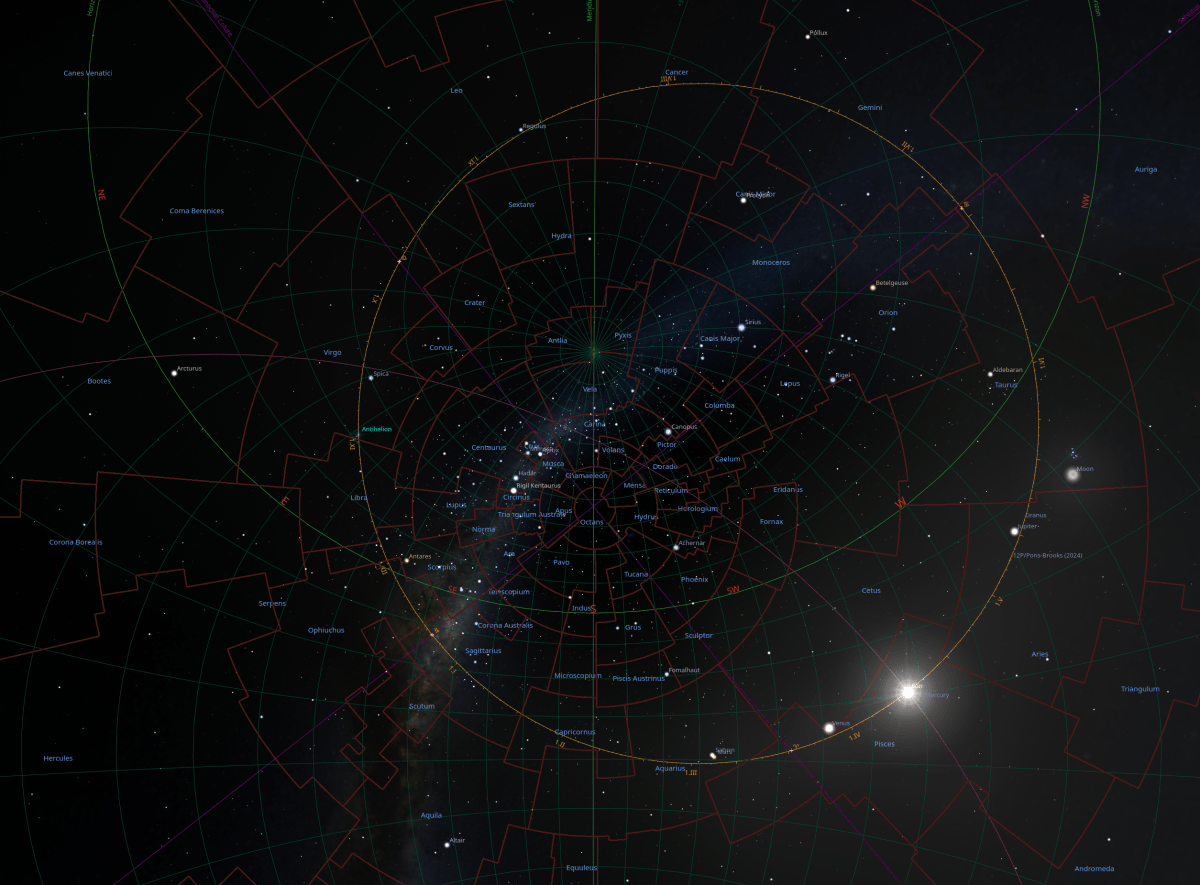
If the horizon is sitting across the screen when you look at it, you can move along it to face it the way you feel is where you are looking, but select ‘North or South’ as this will put the Meridian vertical in the middle. If you put the Meridian so it is straight, you can move the sky up and down it until you make the ‘Colures’ become straight. The ‘Colures’ should land right in the center of your screen in a cross, once they are straight. (i find if i drag the sky around rather than push it, then i can have more control over placement.) The Sun’s Ecliptic should be visible constantly once the colures are a straight cross.
You can see the Ecliptic and where the Sun is and everything. If you look closer at the feature picture you can see the Sun’s path through the constellations very clearly. You can see the ‘Colures’ how they make the center, and the whole wheel turns on an off-centered circle that changes its axis as it goes.
i have copied and pasted this next paragraph from my other post because although it repeats what i may have said, it does come to the point well.
to center your unclock, you make the map size it’s smallest with the computer mouse scroll wheel, so that the Sun’s Ecliptic should remain totally visible for you once centered, then move along the horizon and put in the middle, North or South, then use the Equinoctial Colure and the Solstitial Colure, to make a cross with having both colures straight, and where they cross, will be put in the center with the meridian straight and vertical. (sky and viewing options window>markings>colures)
Over the months of being on this map, you begin to have an amazing solid perspective grow in you. You begin to see the geometry of the Stars, and our planet.
the practical
You can use the horizon, the mid-heaven, and the Nadir, to guide you through your day. The Opposition Conjunction Longitude line, the ‘O./C. longitude’, can let you know when it is a full moon, as it goes from the Sun directly to the opposite side of it’s ecliptic. A conjunction is when the Sun and Moon come together and this is the New Moon, which is the beginning of the month. You can follow the moon through the constellations as it goes around, and you can click on the moon to read things like what constellation it is in.
It has you with the Sun and the Moon around the Ecliptic and you know where they are, and in what constellation, at all times. This system pairs well with the calendar as it really needs more information on the ecliptic to deliver to an unclock potential, but you know at a glance whether the Moon is leading up to the Sun and therefore in the second half of the month, or moving toward the opposition point of the Sun, and therefore in the first half of the month. It will keep you very aware of the Moon Month.
Here are some things i have been exploring that you might find beneficial or simply joyfully interesting. You may like to keep it fairly simple, so you can get used to individually featured information, by just trying a couple at a time and leave them there for while, but whilst keeping the foundational set-up that was described in the software section.
In the ‘Markings’ window i use these choices.
In the first column; Azimuthal grid, Equinoxes (of date), Solstices (of date), Apex points, Galactic center and anticenter, Cardinal points 8, 16, Compass marks.
In the second column; Equator (of date), Ecliptic (of date), with Solar Dates, Horizon, O./C. Longitude, Meridian, Altitude, Colures, Precession circles, Prime Vertical.
In the third column; Celestial poles (of date), Ecliptical poles (of date), Zenith and Nadir, Galactic poles, Supergalactic poles, Quadrature circle, Antisolar point, Earth umbra, Earth penumbra, Invariable plane of the Solar system.
In the ‘Sky and viewing options window’, in the ‘SSO’ tab, there is a check box called, ‘planet markers’ that you can try. There is a check box just up a little and to the left called, ‘labels and markers’, and i think that one needs to be checked too. This is interesting as it is easier to find the planets.
the limitless
Things like the ‘Equator (of date)’ i just found, and it is exciting as my perception of the Solar System has grown and it is helping me adjust to the reality of how the Earth tilt actually is. i just try some things and leave them for a long time because although this equipment gives knowledge, it can be almost subconsciously delivered, and because the unclock and calendar is of what is happening every day, it brings true awakening feelings.
i want to make, preferably for desktop computer, an app that has a wheel that sits on the Sun’s Ecliptic, and shows the constellation boundaries very clearly just around this Ecliptic. The amount of days the Moon has for it’s month, can be clearly marked on this wide ring that is mounted on the Ecliptic. As the Moon moves around the ecliptic, the day markings stay with the movement of the Moon, and this leaves the Sun to pass through these day markings, as the Moon and it’s month and markings rotate many more times per one revolution of the Sun. It would have the half and full Moon marks with digits that light up when in specific locations, and it being that the Sun also moves with all the Moon Month markings, because all of this move on a bigger wheel which travels a different velocity again, while bearing itself on the Equinoxes and Solstices who are holding our flight, and even those would be moving.
The Moon’s month could reset itself upon each month because each month would be different, and you could scroll forward and back to search months. This wheel can have the Eclipses noted and also the Solstices and Equinoxes. It can have a slight color change to denote the night and day for your location.
This whole formula can then be designed to work with Augmented Reality, using eyesight contact lens and a digital watch for it’s controller. A pair of goggles can be designed to house this tool also. The wide ecliptic can vary in it’s transparency as it is an AR belt going around the wearer. It could work in an AR sphere around the wearer, that is about two, to four meters in radius, and therefore be limitless as to what information can be accessed. This device would be capable of giving total limitless mapping capacity, because it is sourced from the movement of Planet Earth’s rotation in reference to the Sun. It knows where it is.
Being aware of location moving constantly, all becomes movement not moment. One begins to see the other side of the world in comprehensive geometry, therefore connects others portals.
Both the real time natural calendar and the unclock are important instruments of navigation. This locational foundational insight of bearing for the human, i believe is the most important information the human can be given in all the eras we know of. With this asset the human will awake to be the powerful mind of being that is who they are.
(just something that means a lot to me; it is almost like this is Tripitaka delivering the scriptures.) that is how important i believe the calendar and the unclock is.
Human has the ability to orchestrate Planet Earth and all it’s inhabitants to wake up with this map as their key.
There is literature that states there was a calendar that begun the year, with the Sun entering Aries, as this constellation is known as the first constellation in the cycle. Aries is relative to the head of the body and Pisces is relative to the feet of the body. There is a picture of a man’s body in a circle to depict this procession of constellations.
There are stories relating “April Fools Day” to be a ploy to portrait people as silly, if they retained the natural calendar, and did not move to the Gregorian Calendar when it was being put in the place of dominance over all other ways of life.
In the year 304 the Sun moved into Aries on the 25th of March. i’m theorizing with these dates and sky movement whilst i use the unclock to observe them. i found information that illustrates that in this period they were possibly calling people April fools if they retained beginning their year at this point of the Sun cycle. Also it was around the year 300 that Constantine supposedly removed the natural calendar, and had given the people the Gregorian calendar. There is also reference to people being called April fools for not using the Gregorian calendar right up to the 1500’s. These findings also fit with the fact that the ‘even 30 degree constellation wheel’ that the astrologers use, is still set to around that place on the Gregorian calendar, if you refer to where things are now in the planetarium and compare it to then. This has also got a lot to do with the Sun and constellation positioning and the transition to the age of Aquarius. The astrologers didn’t move, but the planetarium did. It feels like the installation of the ‘even house 30 degree system’ for the Astrologers, may have been to hide the truth in the same way the Gregorian calendar does. (i’ve studied a little of Astrology and i still do not know why they use this system.) On observation, they have this ‘even 30 degree constellation wheel’, looking attached to the months in the Gregorian calendar, so it maybe part of the design that is being used to hide the truth.
With beginning the Solar Year when the Sun moves into Aries, i do have a study i am looking at, as to do with the Vernal Equinox. i theorize that in about the year 2600, the Vernal Equinox will move into the constellation of Aquarius. The Colure moves into the Aquarian constellation house in around 2070, but that is not on the Sun’s ecliptic with the actual equinox. i’m unsure how i feel as to the beginning of the new age, as even in 2070, i feel there would be a shift of houses. It looks that the Vernal Equinox was at the cusp of Aries and Pisces around 60BC, and the Sun moves into Aries around that same place in this extended era, where the Astrologers still have their constellation wheel begin from. The most interesting aspect of this traversal, when it happened supposedly on the 25th of March, is that as the Equinox would have been going from Aries to Pisces, the Sun was going from Pisces to Aries. i theorize as to the Vernal Equinox designates a Solar year and how to see this in reference to Sun enters Aries being the Solar year landmark keeping in mind, that particular traversal. The Vernal Equinox has an Aries symbol to represent it. i imagine there is a bigger cycle at hand.
To let my mind wander into this image, is something i find truly astonishing, like it holds an extremely important key. It is a convergence in the Galaxy.
The closest i can find where the Sun and the Vernal Equinox both crossed the boundaries of Pisces and Aries together is; 61BC March 23rd at 23:34:24 UTC. Incidentally, there is evidence that says that the Antikythera mechanism was lost by shipwreck around 70BC to 60BC.
i wonder this Vernal Equinox being the umbilical chord of Earth through the Sun, to the Galactic Center.
The convolution of the circle and the wave, amalgamates in spiral velocity of spherical oneness. In the moon’s travels, the length of the path that it leaves is longer than the one it is about to travel, because it is moving whilst mounted on a moving wheel, when observing the ecliptic that it is moving on.
Everything is moving and nothing repeats. It shifts every cycle, and perhaps this is the nature of all cycles. They Spiral, not cycle.
If you ponder the awareness of how things feel when the moon is in certain patterns with the Sun and more, then you can apply this way of thinking with the great Sun Cycle. It is a wonderfully huge sinusoidal wave that the Sun weaves as it travels its ecliptic around us, with the Moon painting its own sinusoidal wave form using the Sun’s wave as its “y” axis.
On the ‘Eclipses’ app, it displayed the path of the eclipse’s shadow of the 8 – 9th of April 2024, and this path is the shape of a sinusoidal wave.
I have built a full year calendar for three parts of the world. There is AEST for Australia, PST for America and CET for Germany. You can compare how the moon visits places like Cetus and Auriga for one hemisphere, and may not visit them in the other hemisphere at that part of it’s journey.
to center your unclock, you make the map size it’s smallest with the computer mouse scroll wheel, so that the Sun’s Ecliptic should remain totally visible for you once centered, then move along the horizon and put in the middle, North or South, then use the Equinoctial Colure and the Solstitial Colure, to make a cross with having both colures straight, and where they cross, will be put in the center with the meridian straight and vertical. (sky and viewing options window>markings>colures)
To build the calendar, i use three apps and a desktop planetarium program called ‘Stellarium’. The Apps are ‘Moon Seeker’ for the Moon phases and their times, ‘Sun Seeker’ for the solstices and equinoxes, and ‘Eclipses’ for the eclipses. i use Stellarium for the Sun and the Moon’s constellation traversals. Stellarium also confirms and helps verify information as it is what i am using for my unclock at the moment. i have written a post to describe how i set it up so that if you find inspiration to make your own unclock, it is called, ‘building your own unclock’.
(to find the Solstices and Equinoxes, touch the “Now” button up the top right. (it might be showing a date if not now)).
This calendar is exactly what is going on around us according to the tools i have used. There is no place to be, other than on this map basically because this is where we are literally.
i want to develop the calendar, to be able to be designed so that i can arrange time zones easier. In this version i have built it so the numbers are in their own cell, with the idea that i can switch time zones in one go, but because many ecliptics are oval shaped, and their constellation reference location can vary when in each hemisphere, this was not successful.
i can do it for the Moon phases, the solstices and the eclipses, but not the traversals of the Moon through the constellations as yet. It is to do with, the Moon phases are relaying data that is referencing to the Earth’s axis which would put it the same for all of us. This is the core of importance for this map, as this lets all human feel those particular movement vibrations at exactly the same moment, and this is actually what puts the dimension into movement not moment. This is where human connects to source. It is the core of Earth.
i like visualizing the fact that we are all like antenna because we all have our own Zenith, and as the Moon traverses a constellation border, it would send the smoothest very close together wave from East to West across all our antenna. i think this would be very fast as it went. Like all in an instant, but a wave motion. Human is a microcosm. Everything that is around a human holds total parallels to what is in human, so this individual specific location of each human is a heavenly body. The antenna aspect of human is the dance of the infinite spheres. Everything is the dance of the infinite spheres. Human is the Earth.
The unclock has the ability to do everything the calendar can do, but the calendar has helped with setting the stage for the shift to the new dimension to be able to begin much sooner.
i study in the direction of app building, but it is a long road. i began working on an app in blender and hope to get back to it soon. To build what i am really wanting to build, i think i would not have the expertise before i pass, but i hope my work is of benefit. i would like to pass this information now though as it is needed now. To work with others on this project is protege.
The calendar is of great value. It puts you on the map in an instant. It has you with the Sun and Moon constantly. It has the year, month, week and day all very visible at a glance, but i believe the unclock is very important also. The unclock being devised from a planetarium, will give you where you are in relation to the Sun and Moon right throughout the day. I am hypothesizing a build that holds the moon month stations, one month at a time, according to the one you are in, on the Sun’s ecliptic and the Sun moves around it, as the whole wheel moves to show the day’s sunrise, sunset, mid-heaven and nadir, to the backdrop of the constellation boundaries in that wheel, so that it is just that ecliptic, not the whole heaven. It means you get the correct overall information in one glance or a good stare and the solstices and equinoxes can be on that wheel, so then you can see the seasons also.
The essence of this calendar and the unclock is that you are constantly given knowledge. It never stops coming to you. It means, when you look at this unclock, you see so much before and after where you are, it becomes all now, which is congruent with the fact that it becomes movement not moment. The new dimension. You become more and more part of the everything.
i want to remove the words calendar and time from the title of this information, as these words have the vibration of slavery in them. i also want to remove the fixation of time for the unclock and eventually for computers themselves, and focus on location and movement, but the shift to that realm can’t be given at a faster pace than it is being received.
The truth is not in a rule that was composed by an animated being. The Truth will only ever be in structure of life. The truth is an infinite mathematical platform that can be brought forth to you be. You are this truth. You are the builder. You are the build.
Everything in the dimension in which we reside in now, is built in technology of limitation. We do not need to remain this way.
This is a door. If we can map something, we can go there.
This is the method of putting back together, the one brain that human is.
–
in the update of version 06 i have put some Jupiter and Venus traversals, because there are some truly unique movements. In the first month as Venus is entering Taurus, The Sun is conjunct with Jupiter and as Uranus enters Taurus, Venus is conjunct Jupiter.
In the update of version 07 i have put that Mars returns to his home constellation of Aries on the 4th or 5th day of the second month (depending where you are). I also put that Mercury has entered Taurus on the start of the last week of the month. Mercury traveled through Cetus twice on his path in and out of Pisces. He will have lots to share when he reaches the Sun again.
In the update of version 08 i wanted to let you know there was a Mars conjunct Jupiter. It was aligned at 02:45:00 on the 15 Aug 2024 AEST. Also Mercury went into the constellation of Sextans around 6Aug2024, for about 5 days and there is a comet coming too. The comet conjuncts the Sun twice. Once around 5Sept2024 on it’s way in and then around the 10 Oct 2024 as it departs for it’s journey back out to space, and it’s called, “Tsuchinshan-ATLAS”. There is a double star of the constellation Virgo that is almost placed exactly where the comet is on conjunction with the Sun as it leaves. (It’s name is S 647 – HY Vir HIP 64120 -HD 114125 – SAO 139174 – WDS J13085-0241.) Another interesting event is Venus goes into Pegasus for two days around 22Mar2025 .
i have now made the PST and CET calendar to have both the global and the local placements of the conjunctions, and i hope to do AEST directly. The conjunctions with the Sun were already done in global.
in the version 08-4 for the PST calendar i could see the last four or so months has dubious dates and times for their quarters, so i addressed this. This particular version has all the back dated extra events that i have been finding and putting in my News notes in my Second Life profile. i pencil mine in on a hard copy but each time i found a new entry wanted it recorded digitally and the best way was the PST calendar as i use SLT along side my AEST in my inworld profile and SLT is equivalent to PST.
–
It is wise to take into account that all Moon, Sun and Earth bearings taken in direct reference to each other are felt by all beings on planet Earth at the same moment because they are referenced from center of globe to center of globe, but movements from constellation boundaries are set at your location. A constellation boundary movement in East Australia can be things like, about 2 hours 17 minutes and 26 seconds different to Berlin Germany, because it is referenced to longitude and latitude on planet Earth.
i have been retrieving all the conjunction of planets data, using the ecliptic grid rather than the equatorial grid and amend this data, because that will be a reading in which all beings will feel it at once. i am yet to discern what i am looking for to do this with the constellation movement. (So far for now i have left both global and local coordinates for the conjunctions as i felt it was silly to scrap the local coordinates without considerable thought.)
(the conjunction data for the Sun is already done using the ecliptic grid as i used the line of the ecliptic longitude which passes through both ecliptic poles, being the Sun and it’s opposition point.)
It is good to remember that no matter what day and no matter what time the western system says it is, the moon phase shift from quarter to quarter, moon week to moon week, is still the exact same moment for everyone on planet Earth as it happens. We all move together no matter what which means we all feel it together.
it is the ecliptic notion that matters. The eclipse of a heavenly body is the eclipse of you. This is the alignment. Align your body in its posture and clarity will come.



 Map of Now
You must be logged in to post a comment.